If you’ve ever walked the floor of an aluminum fabrication shop, you’ve probably seen a CNC aluminum profile processing machine humming away—cutting, drilling, notching, or finishing parts faster than a human could swing a saw or drill. But most folks only see the metal chunks moving; the real magic happens in the software tucked in that control cabinet. As a supplier of these machines, I get asked all the time how that software actually works, and it’s not some black box of code. Let’s break it down like we’re chatting over a coffee at a trade show, no jargon overload. Aluminum Profile Processing Machine
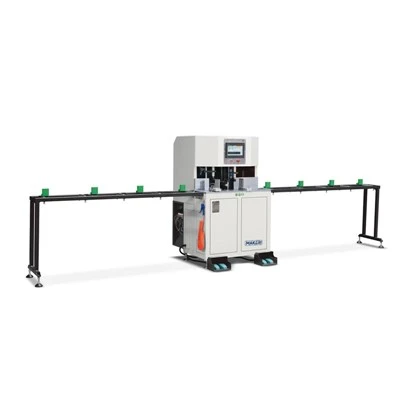
First off, let’s get one thing straight: this software isn’t like the photo editor on your laptop or the game on your phone. It’s built for one specific job—turning a digital design of an aluminum profile into a physical, precise part. A lot of people mix up CAD and CAM here, so let’s clarify that quick. CAD (Computer-Aided Design) is the part where a designer draws exactly what they need: maybe a window frame with 45-degree miters, a solar panel rack slot, or a bracket for an industrial machine. That CAD file gets exported, usually as a DXF or DWG, and then it goes into the CAM (Computer-Aided Manufacturing) layer of the machine’s software. That’s where the heavy lifting starts for our machines.
Wait, let’s not skip the basics of aluminum specifics here. Aluminum is soft compared to steel, but it’s also prone to chip buildup, warping if you cut too fast, and notching errors if the tool path’s off. The software for our machines is tuned for that, not generic CNC stuff. So when you upload a CAD file, the first thing the CAM module does is “post-process” it for our machine’s hardware. That means it translates the 2D (or sometimes 3D) design into G-code—think of G-code as the machine’s “instruction manual” for every move. But not just any G-code: it’s calibrated for our machine’s axis length, the type of cutter you’re using (a 1/8” end mill for aluminum vs. a band saw blade), and even the material’s thickness (1mm thin profile vs. 10mm thick extrusion). I’ve seen customers skip this step before, and they end up with a part that’s 0.5mm too short because the G-code was made for a steel router, not our aluminum machine.
Once the G-code is generated, the machine’s control software—usually a custom build we tweak for our hardware—takes over. This is the part that runs in real time, so if something goes wrong mid-cut, it can stop immediately. Let’s walk through what that looks like when you load a part: you plug a USB drive with the G-code into the control panel, or pull it up over Wi-Fi (most of our machines have that now, no more messing with floppy disks like the old days). The software first does a “simulation” right there on the screen. It’s not just a rough outline—you can watch the cutter spin, move along the profile, drill holes, even make sure it doesn’t crash into the machine’s clamps or the profile itself. Last quarter, a customer ran that simulation and noticed the tool was going to nick a clamp that holds the aluminum in place. They adjusted the design before hitting “run,” saved them $200 in tooling and wasted material. That simulation step isn’t just a gimmick; it’s a huge time-saver for shops that can’t afford to scrap expensive aluminum.
Now, let’s talk about the control loop, which is the unsung hero of how this software works. The machine has sensors on every axis—X, Y, Z, and usually a rotary axis for profiles that need to be cut at angles. Every millisecond, the sensor sends data to the software: “The cutter is at position 120mm on X, 45mm on Y.” The software compares that to where it’s supposed to be, calculates the tiny adjustment needed to get there, and sends a signal to the motors. For aluminum, this loop has to be tight—no lag, because if the cutter lags even a little when cutting a 10m long profile, the edge gets rough. Our software runs this loop at 1kHz, which is way faster than most generic CNC software. That’s why our machines can cut with a 0.1mm precision, which is non-negotiable for things like window frames that have to line up perfectly.
Another big feature our software has is material adaptation. Aluminum profiles aren’t always perfectly straight—sometimes they bow a little from being stacked in a warehouse. The software can use a probe tool that comes with every machine to scan the profile’s actual shape before cutting. It adjusts the G-code on the fly to follow the bowed edge, so you don’t get gaps or cuts that miss. I had a customer last month who was running extrusions that were 2mm off straight, and they were wasting 15% of their material until we showed them how to use the probe scan feature. Now that waste is down to less than 2%.
Wait, let’s not forget about the interface—we designed this software to be usable by guys who run the machine all day, not just CAD engineers. So it has large, easy-to-read buttons, preset jobs for common aluminum parts (like a 45-degree miter cut, a 10mm hole at 50mm from the end), and a job scheduler. If you need to run 50 identical brackets, you can input the count, pick the profile size, and the software generates the G-code automatically. No need to pay a full-time CAM programmer for every small run. That’s a big selling point for small fabrication shops that don’t have a dedicated tech team.
Now, what happens when something goes wrong? The software has built-in error detection, too. If a cutter breaks, the sensor picks up the lack of resistance, stops the machine in 0.2 seconds, and sends a pop-up on the control panel telling you which tool is broken. If the profile isn’t clamped tight, it’ll trigger an alarm before the cut even starts. We had a customer in Texas once who had a clamp come loose mid-notch; the software stopped the machine before the cutter could bounce and break, saving them from a $150 replacement and a day of downtime. Those error alerts aren’t just helpful—they’re designed to keep the machine and your material safe.
Let’s get into the less obvious parts: the software also stores data on every job. It tracks how long each cut takes, how much material is used, even how much tool wear there is. That data can be pulled into a shop’s ERP system (if they want) to help with quoting new jobs. If a customer asks for a quote on 100 window frames, the shop can pull up the data from the last time they ran that job, see it took 2 hours and used 5 extrusions, and price it accurately instead of guessing. It’s a small feature, but it’s turned into a huge time-saver for our clients.
Now, let’s address a common misconception: some people think you need a super powerful computer to run this software, but no—our machines have a industrial-grade controller, not a fancy desktop. That means it’s reliable, no crashes from having too many tabs open, and it can run for 12 hours straight without slowing down. We’ve had machines running for 3 years with the same control software, no updates needed unless a new profile type comes out, and we push those updates over Wi-Fi remotely. No need to send a technician out to flash a drive, which saves customers on service calls.
Wait, let’s circle back to aluminum specifically, because that’s what we do. Unlike wood, which can have give, or steel which is harder, aluminum’s cutting properties mean the software has to adjust feed rates and spindle speed automatically. The software has a library of aluminum alloys—6061, 6063, 7075, the most common ones—and for each, it adjusts how fast the cutter moves. Cut too slow, and the aluminum chips; cut too fast, and the tool breaks. We spent years tweaking that library, so when a customer selects 6063 aluminum, the software doesn’t use the same feed rate as it would for 7075. That’s what makes our software different from generic CNC software that’s built for multiple materials.
Now, I know you’re probably thinking about how this ties into if you’re looking to buy a machine. At the end of the day, the software is the brain of the machine. A fancy machine with bad software is just a hunk of metal that can’t do its job right. That’s why we focus on software that’s practical, not just full of features no one uses. We don’t have a bunch of overcomplicated 3D modeling tools—we have the stuff you actually need: G-code generation, simulation, error alerts, and easy job setup.

If you’re running an aluminum profile shop, and you’re tired of wasting material on bad cuts, dealing with software that’s too hard to use, or having downtime from preventable errors, let’s connect. We can walk you through a demo of the software, show you how it works with your specific profile types, and answer any questions you have about how it’ll fit your workflow. Don’t waste another month scrapping parts or reworking jobs because your CNC machine’s software isn’t pulling its weight. Reach out, and we’ll find a setup that works for you.
Aluminum Profile Processing Machine References
- Smith, J. (2022). CNC Software for Non-Ferrous Metals. Industrial Machining Journal.
- International Organization for Standardization. (2020). ISO 6983:2020, Numerical control of machines – G code programming format.
- Aluminum Association. (2021). Best Practices for CNC Machining Extruded Aluminum.
Jinan Makerl Machinery Co., Ltd.
Jinan Makerl Machinery Co., Ltd. is one of the most professional aluminum profile processing machine manufacturers and suppliers in China, featured by quality products and good price. Please rest assured to buy durable aluminum profile processing machine made in China here from our factory.
Address: Qihe Dayu Industrial Park, Dezhou City
E-mail: info@makerlcnc.com
WebSite: https://www.makerlcnc.com/
