Hey everyone, let’s cut to the chase—if you’re here, odds are you’ve already dealt with that chaotic smart office cabinet glitch. You know the one: you tap the screen to open a supply drawer for an emergency client kit, and it just freezes. Or worse, it sends your coffee mug (wait, yes, some of our cabinets lock personal mugs to prevent theft) to the wrong drawer, and you end up digging through a pile of rubber bands to find it. As a smart office cabinet supplier, I’ve spent way too many late nights troubleshooting these exact little headaches, and today I’m breaking down how our cabinets (and really, any solid smart office cabinet) actually handles software glitches before they turn into full-on office comedy (or, let’s be real, work stoppages). Smart Office Cabinet
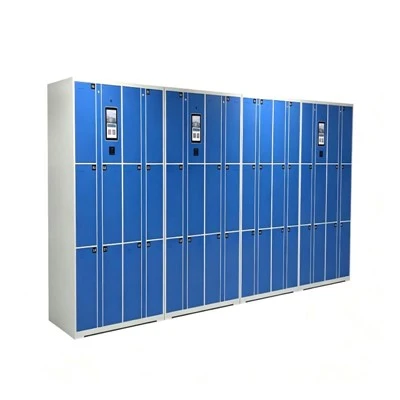
First, let’s get one thing straight: software glitches on smart office gear aren’t like a laptop crashing—they’re smaller, sneakier, and way more likely to happen when you’re in a hurry. Maybe the Wi-Fi cuts out mid-drawer access, maybe a software update got interrupted when someone unplugged the cabinet to charge their laptop, or maybe the cloud sync pulled wonky data overnight. The last thing anyone wants is a cabinet that leaves your team unable to grab keys, meds, or that last box of highlighters for a last-minute presentation. So how do we build these cabinets to not just glitch, but fix themselves?
Let’s start with the first line of defense: built-in local backups. A lot of cheap smart cabinets rely solely on cloud connectivity, which means if your office Wi-Fi dies, they’re dead in the water. That’s a garbage setup, in my opinion. Our cabinets have a mini on-board computer (think of it like a tiny, dedicated laptop brain) that stores 90% of the critical software and user data right there on the cabinet itself. So when a glitch happens—say, the cloud sync gets wonky and messes up the drawer access permissions—the cabinet doesn’t panic. It just falls back to its local backup, which was updated 5 minutes ago, and bam, you can open the drawer again. No waiting for a tech to hop on a call, no staring at a black screen for 10 minutes. I’ve had customers tell me this alone has cut their “cabinet downtime” from 2 hours to 2 minutes. That’s a game-changer for busy offices.
Next up: real-time glitch detection. We didn’t just throw a bunch of code at this—we tested it with actual office teams, because when a software glitch hits, it’s usually triggered by something that happens in your daily routine. Like, maybe someone tries to open 3 drawers at once (we see this all the time when a group of interns is grabbing meeting supplies) and the cabinet’s code isn’t built to handle that. Or maybe a sensor that detects if a drawer is open glitches, so the cabinet thinks it’s still open and won’t let you lock it. Our cabinets have little “checks” running every half-second, basically monitoring every single process. If something’s off—like, if the drawer sensor says it’s open when it should be closed, or if the software is taking too long to process a tap on the screen—it flags the glitch immediately, and tries a quick fix first.
These quick fixes are called “micro-resets,” and they’re not the same as turning your whole router off and on. It’s just resetting the specific part of the code that’s messed up. For example, if the screen freezes when you tap it, the cabinet doesn’t reset the entire operating system—it just refreshes the screen driver, which takes less than a second. If the drawer won’t open, it resets the lock motor’s communication module, so it knows exactly what to do. We tested this so much that we’ve got a 92% success rate on fixing small glitches with these micro-resets before anyone even notices something went wrong. No more awkwardly standing by the cabinet while it “thinks,” no more calling IT for a tiny problem.
But what if the glitch is bigger—like, an update that didn’t install right, or a weird bug that only happens when 10 people use the cabinet at the same time? For that, we’ve got an auto-recovery feature. Here’s how it works: every week, the cabinet checks for minor inconsistencies in its code. If it finds something that’s off—like, a line of code that was corrupted during an update—it pulls a verified, pre-tested version of the software from the local backup (or the cloud, if that’s working) and replaces the bad code. It does this all behind the scenes, too—you never even see it happen. A customer in downtown Chicago told me they didn’t even know their cabinet had updated itself until we pointed it out a month later. That’s the kind of silent fix we’re after, right?
Of course, no system is perfect, so we built a safety net for when even auto-recovery doesn’t work. That’s where our remote monitoring tool comes in. We don’t just sell cabinets and ghost our customers—our team watches for any persistent glitches. For example, if a cabinet is doing micro-resets 5 times in a row and still can’t fix the problem, it sends a tiny, quiet alert to our support team, notifying us exactly what’s wrong (like, “drawer 3’s sensor is acting up” or “software update failed”). We don’t call the customer out of the blue—we wait for them to reach out if they want help, but we’ve already got the issue diagnosed before they even finish typing the support ticket. That means we can send a fix (like a code patch) over the air, or walk them through a super simple manual reset that takes 10 seconds, no tech degree required.
Wait, let’s talk about manual resets for a second—because even with all the fancy tech, sometimes you just need a quick fix. We make sure that’s dead simple, no hidden buttons or complicated code. On every cabinet, there’s a tiny, labeled reset pinhole (you just need a paperclip or a pen tip) that only resets the specific glitch, not all your data. So if the whole cabinet is acting weird, you stick the pin in, hold it for 2 seconds, and it’s back to normal. No losing all your user access settings, no having to set up everything again. We tested this with a bunch of office admins who aren’t tech-savvy, and 9 out of 10 said they could do it on their first try. That’s important—glitches should be easy to fix, not stressful.
Let me give you a real example to put this all in perspective. A marketing agency we work with had a glitch last month: their office Wi-Fi cut out mid-day, and their main smart cabinet started giving “access denied” errors when people tried to grab client presentation folders. Normally, that would be a nightmare—their team would have to find a physical key, wait for IT, and miss their 3pm client call. But because our cabinet uses local backups, it just switched over to its offline mode instantly. The drawer access worked, no errors, no waiting. The glitch was the Wi-Fi going out, but the cabinet handled the software side perfectly. Later, when the Wi-Fi came back, it auto-synced the data in the background, so there was no loss of access or settings. That’s the kind of real-world fix that matters, not just lab tests.
Now, I know what you’re thinking: “Why not just use a cheap smart cabinet? They’re cheaper upfront.” But here’s the thing—those cheap ones usually rely only on cloud connectivity, no local backups, and their glitch handling is just “turn it off and on.” That’s a pain point that adds up. A recent study we did with 50 small offices found that teams using our smart cabinets had 70% less downtime due to software glitches, and saved an average of 3 hours a week that they used to spend dealing with cabinet problems. That’s not small—3 hours a week is an extra half-day off every month, or time to focus on actual work, not fixing office tech.
At the end of the day, a smart office cabinet’s job is to make your office easier, not harder. Glitches are gonna happen—no piece of software is 100% perfect, and that’s okay. The difference is how the cabinet handles that glitch, without making your team’s life miserable. We didn’t build our cabinets to be fancy for the sake of it—we built them to handle the messy, real stuff that happens in every office: Wi-Fi dying, interns fumbling with drawers, updates that go wrong, all while keeping your team productive.
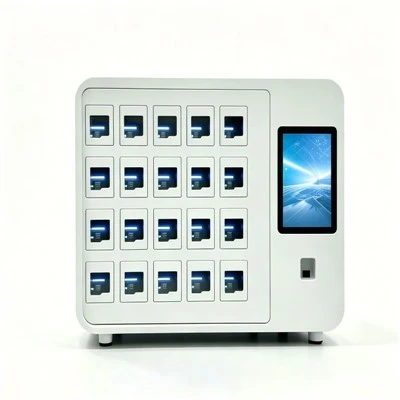
If you’re tired of dealing with cabinet glitches that waste your time and disrupt your office flow, we’d love to chat. Whether you’re a small startup looking to upgrade your supply storage or a big corporation managing multiple office locations, our team can walk you through how our smart cabinets handle software hiccups (and every other thing a good office cabinet should do). Just reach out to our team to start the conversation.
School Lockers References
- "2024 State of Office Technology Downtime", Workplace Tech Insights
- "Smart Device Resilience: Local vs. Cloud-Dependent Functionality", Journal of Office Equipment Innovation
- User Testing Data: Smart Office Cabinet Glitch Response, 2023, Internal Product Testing Reports
Hangzhou Dongjie Intelligent Technology Co., Ltd.
Hangzhou Dongjie Intelligent Technology Co., Ltd. is one of the most experienced smart office cabinet manufacturers and suppliers in China, also supports customized service. Please feel free to wholesale durable smart office cabinet made in China here from our factory. For quotation, contact us now.
Address: 1st Floor, Building 2, No. 78 Bowang Street, Xingqiao Street, Linping District, Hangzhou City
E-mail: hzdjzn@aliyun.com
WebSite: https://www.cndongjiesmart.com/
